How to Choose a Selling Team App That Actually Gets Used

Written by

Cosmy
AI-driven eCommerce Optimization
A selling team app is a central command center for your eCommerce business. It’s designed to bring all your scattered data, team communication, and different tasks into a single platform. Think of it as replacing a messy combination of spreadsheets, chat channels, and various analytics tools with one clear source of information.
The goal is to help your entire team make faster, smarter decisions.
Why Your Amazon Team Needs a Central Hub

Managing an Amazon brand can feel like you're trying to do ten things at once. Information is stored in too many places, which leads to confusion, mistakes, and missed opportunities.
Imagine a typical product launch. The brand manager is coordinating the project, but:
The content team is updating product descriptions and A+ content in a shared drive.
The marketing team is running ad campaigns from a separate advertising platform, tracking clicks and spending.
The inventory team is looking at stock levels in another system, trying to predict future demand.
Without a central app, the brand manager spends the day asking people for updates and trying to piece together a clear picture of what’s happening. This reactive approach leads to missed deadlines, inconsistent product messaging, and a poor understanding of what actions are actually driving sales. When your data is siloed in different places, you can't see the whole story.
Shifting from Reactive to Proactive Strategy
A dedicated selling team app changes this situation. It creates a single, shared view where everyone—from content writers to marketing specialists to logistics coordinators—sees the same data, tasks, and goals. This isn't just about getting organized; it's about shifting from putting out fires to planning ahead.
Instead of asking, "Why did our sales drop last week?" your team can proactively identify, "Our main competitor just updated their A+ content, and our keyword rankings for 'organic dog food' are starting to slip. Let's adjust our content now before it becomes a problem."
This proactive approach is crucial, especially as Amazon’s own AI search evolves. You need a tool that gives you a clear, real-time view of how your products are performing and which actions will make the biggest impact.
To understand why this is important, look at specific sales team use cases to see how a central app solves common problems. By connecting different departments, a unified platform helps everyone understand how their work contributes to the larger business goals.
For example, a content manager can see exactly how their latest description changes affect the product's conversion rate. A marketing specialist can tie ad spending directly to improvements in organic search rank. This level of clarity is nearly impossible to achieve when your information is scattered across different tools. Ultimately, a unified platform simplifies complex work, giving you a clear view of what truly drives your business forward on Amazon.
Defining What Your Team Actually Needs

Before looking at app features, you need to identify the biggest problems in your current process. This is the most important step, but many teams skip it. They jump straight into product demos and feature comparisons, and a few months later, they are stuck paying for a tool that doesn’t solve their real issues.
The right selling team app should fit into your existing workflow, not force you to completely change how you operate.
Start with an honest internal audit. Get your content manager, marketing lead, and head of eCommerce together and ask them to share their main frustrations. Where do things get stuck?
Is it the constant back-and-forth emails just to get a new piece of A+ Content approved?
Is it the tedious task of pulling reports from five different dashboards to see if an ad campaign is working?
Or is it the simple fact that two people are often working on the same task without knowing it?
Pinpointing these specific issues gives you a clear target. For example, one brand realized their biggest problem wasn't sales tracking, but their chaotic content creation process. They chose an app with strong collaborative editing and approval features, even though it lacked the flashy analytics of other tools. It was a perfect fit because it solved their actual problem.
Separating Needs from Wants
Once you've identified the problems, you can separate "must-have" features from "nice-to-have" ones. This is essential for controlling costs and choosing a tool your team will actually use. A must-have directly fixes one of your identified bottlenecks. A nice-to-have is a cool feature but not essential for your core operations.
This process gives you a practical checklist to evaluate potential apps. You also need to think about who on your team needs access and what they should be allowed to do. A content writer probably just needs to create and edit listings, while a brand manager needs to see performance dashboards and approve final changes.
The goal is to find a solution that reflects your team's real-world structure. A good selling team app lets you set specific permissions, controlling who can view, edit, or publish certain assets. This provides both security and operational clarity.
Your checklist should clearly define these roles and permissions. To help you prioritize, here’s a simple framework for thinking about essential versus optional features when evaluating different apps.
Essential vs. Optional App Features
This table breaks down common features into what you need to solve core business problems versus what is just an attractive extra.
Feature Category | Essential (Must-Have) | Optional (Nice-to-Have) |
|---|---|---|
Collaboration | Shared task lists and project boards. Commenting on specific assets (e.g., product images). | Built-in team chat or video calling features. |
Content Management | Direct integration with Amazon for updating content. A history of changes made to listings. | AI-powered writing assistance for product descriptions. |
Performance Analytics | Real-time tracking of organic rank and conversion rates. Shareable performance dashboards. | Predictive sales forecasting based on past data. |
User Access Control | Role-based permissions (e.g., editor vs. viewer). Secure login through an official Amazon integration. | Single sign-on (SSO) integration with your company's other tools. |
Use this as a starting point. Your "must-haves" will depend on the specific problems you identified earlier.
By creating this needs-first plan, you stop vaguely shopping for a "better tool" and start a targeted search for a solution to your documented business problems. This focused approach is the only way to guarantee you select a selling team app that provides immediate, real value.
How AI Integration Shapes Your App Choice
Let's be direct: AI in sales technology is no longer optional. For any competitive eCommerce team, it's a core component. When you evaluate a selling team app, the quality of its AI should be a top consideration. This isn't about using popular terms; it's about giving your team a real advantage.
There's a big difference between basic "AI" and a truly intelligent system. Many tools still just offer keyword suggestions based on past search data. Modern AI has advanced far beyond that. It provides predictive insights that help you understand and react to market changes before your competitors do. It turns a flood of data into clear, actionable direction.
Moving Beyond Basic Keyword Data
A truly intelligent selling team app doesn't just guess. It shows you how Amazon's own generative AI—like its shopping assistant, Rufus—sees and recommends your products. This is a major shift in capability. Instead of making content changes and hoping for the best, you get a direct diagnosis based on how the platform itself understands your listings.
For example, a sophisticated AI can analyze your product page and compare common customer questions to the answers Amazon’s AI finds in your content. If there's a mismatch—if the AI can't find an answer—you have an immediate, actionable problem to solve.
This allows you to find exact gaps in your content. You can see where your descriptions fail to address key customer concerns or miss out on ranking opportunities, and then prioritize fixes that will actually increase conversions.
Choosing a selling team app with strong AI is about making smarter, data-driven decisions. As you look at different tools, especially those built on advanced AI, learning about the capabilities of various AI agent platforms is a good idea. It helps you understand the technology behind the insights you're paying for.
The Tangible Outcomes of AI
The right AI doesn't just show you data; it guides your actions and simplifies your entire operation. Recent data shows the clear impact: 83% of sales teams using AI reported revenue growth, compared to only 66% of teams not using AI. For eCommerce specifically, 76% of teams credited AI for their performance gains.
A large part of this advantage comes from automating administrative tasks, which can consume up to 71% of a sales representative's time. Freeing them from this work allows them to focus on high-value selling activities.
A powerful AI integration delivers real benefits your team will notice every day:
Diagnosing Content Issues: Instead of manually reviewing pages, the AI highlights weaknesses in your content, such as poor titles or missing information that hurts your visibility.
Prioritizing Fixes: The system can recommend which changes will have the biggest impact on your ranking and conversion rate, so your team knows where to focus their efforts first.
Aligning Your Team: Everyone from marketing to content management works from the same AI-driven insights. This creates a unified strategy and breaks down departmental barriers.
These capabilities are essential for any brand trying to succeed in today's market. By understanding how AI can make your team more effective, you can make a much more informed decision. For a deeper look at this topic, check out our guide on the role of AI in eCommerce.
Ultimately, selecting a selling team app with strong AI isn't about preparing for the future. It's about giving your team the tools they need to succeed today.
Crafting a Realistic Plan for Integration and Team Onboarding
Let's be realistic. The most powerful selling team app is useless if your team doesn't use it. The success of this investment depends on two things: a simple technical setup and a smart onboarding process for your team. Getting this right from the start is critical.
The technology itself should be easy to implement. Look for a solution that connects to your Amazon account through secure, official integrations. You shouldn't need a technical background or a week of complicated configurations to get started. A simple process, like pasting your product links, should be all it takes to pull the data and begin showing value.
Getting Your Team On Board
Once the technical setup is done, the real work begins: getting your employees to actually use the tool. The biggest mistake is the "big bang" rollout, where a new app is introduced to everyone at once. This usually leads to confusion, resistance, and a tool that no one uses.
A phased rollout is a much smarter approach. Start with a small, enthusiastic group—your internal champions. These are the people who are most open to new technology and feel the pain of your current inefficient processes the most.
Content Managers: They can immediately see the value of an AI-powered audit that identifies content weaknesses they’ve been trying to find for months.
Performance Marketers: They'll appreciate having a direct connection between specific content changes and their impact on organic search rank.
Brand Managers: They get a single source of information to oversee everything without having to ask five different people for updates.
By starting small, you create a controlled environment to gather feedback and build momentum. Their early successes become powerful internal case studies that you can use to convince the rest of the team.
This is exactly how a focused AI process—driven by the right app—helps teams identify real issues and achieve results.
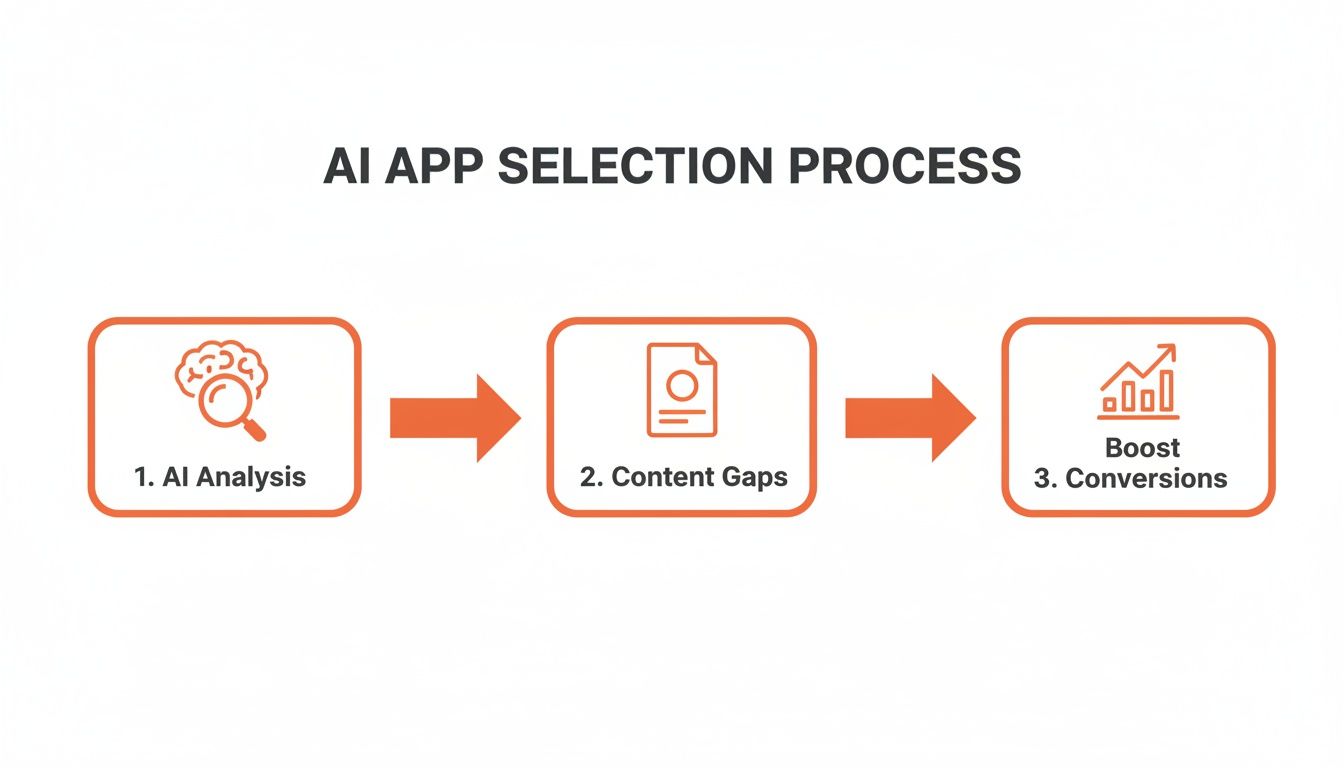
The flow from analysis to identifying content gaps to actually boosting conversions gives your team a clear path to return on investment (ROI) that they can understand and support.
Driving Consistent and Effective Use
Once your champions are on board, it's time to expand. But don't just put everyone into a single, generic training session. That doesn't work. Create role-specific walkthroughs that focus on the features most relevant to each person's job. A content writer needs a different tour than an eCommerce director.
Set clear, measurable goals for app adoption from the beginning. Tie daily or weekly use of the tool directly to performance objectives. For instance, one brand successfully linked consistent app usage to improved organic rankings, showing a clear connection within just 30 days.
This approach addresses a huge challenge in the industry. The average user adoption rate for sales tools is a disappointing 72%, but even that number hides the real problem of inconsistent usage. In fact, a recent report found that 40% of salespeople still rely on spreadsheets and email for customer data, completely ignoring the advanced tools available to them.
You can explore the data yourself and see how rapid onboarding helps by reading the full report on CRM adoption metrics. The only way to get the full value from your investment is to make the app an essential part of your team's daily workflow.
By combining a simple technical setup with a thoughtful, user-focused onboarding plan, you turn your new selling team app from just another tool into an engine for your team's success.
Measuring Success and Proving the ROI to Leadership

So you've invested in a new selling team app. Now comes the hard part: proving to leadership that it was worth the money. Getting approval for next year's budget isn't about vanity metrics like weekly logins. It’s about creating a clear story that connects the app directly to the bottom line.
You need to show how this tool makes your business more efficient, more profitable, and better at working together. Anything less is just noise.
Focus on Core Business Outcomes
To build a case that leadership can't ignore, you have to frame your Key Performance Indicators (KPIs) in terms they understand: efficiency, performance, and collaboration. This approach translates daily app usage into tangible business results and shows you’re thinking like a leader, not just a tool user.
For more on this, our guide on the most important KPIs for eCommerce can help you structure this conversation.
A solid performance dashboard should tell this story at a glance, focusing on metrics that truly matter:
Operational Efficiency: Don't just talk about "time saved." Show them the real numbers. For example: "Content audits that used to take 40 hours of manual work now take just 4 hours thanks to AI analysis." That's a full work week reclaimed.
Performance Uplift: Connect the app directly to Amazon performance. Measure results like a 15% increase in organic rank for your top 10 keywords or a 5% rise in conversion rates on product pages you've optimized with the tool.
Team Collaboration: Show how you're moving faster. Report on project turnarounds, like cutting the average time to get new A+ Content live from three weeks down to just four days.
Building Your ROI Narrative
A powerful ROI narrative combines these hard numbers with the bigger picture of where the market is headed. The AI sales tool market is the fastest-growing segment in sales technology—a clear signal that this is how competitive teams now operate.
When you make your case, highlighting how your new selling team app automates the non-selling tasks that slow everyone down is a huge advantage.
Proving ROI isn't just about software. It’s about showing how a strategic tool gets everyone—content, marketing, and sales—working from the same AI-driven data. When you break down departmental silos, you focus everyone’s energy on what actually drives results.
The data supports this. In the first half of 2025, AI sales tools were already automating up to 71% of non-selling tasks. And a remarkable 90% of top sales professionals now rely on partner tools to maintain their competitive edge. You can find more on these AI mobile application statistics and trends on itransition.com.
By framing your argument around concrete efficiency gains, measurable performance improvements, and faster teamwork, you’re not just justifying a software license. You’re demonstrating that the right selling team app is a core engine for growth.
Frequently Asked Questions
Investing in a new tool for your team always comes with questions. You need to know it’s a smart move for both your team and your budget. Let's address the most common ones.
How Long Does It Take to See Results?
This is a key question. While the full financial return takes a few months to become clear, you’ll see early signs of success almost immediately. For example, an AI-powered content audit can identify critical, revenue-damaging issues with your product listings in minutes, not days.
Once you act on those insights, you can expect to see measurable improvements in organic visibility and "content scores" within 30 to 45 days. The significant sales growth and efficiency gains—the results your finance department cares about—typically become obvious within three to six months. By then, your team will have fully adopted the new workflows, and the benefits will start to compound.
Is a Selling Team App Overkill for a Small Team?
Not at all. In my experience, smaller teams often see the biggest immediate benefits. A good selling app automates time-consuming manual work, like analyzing competitor content or searching for performance gaps in spreadsheets.
This frees up your team's time—your most valuable asset—to focus on strategy instead of repetitive tasks. The goal is to amplify a small team's impact, not bury them in complexity. Look for apps with flexible pricing or free tiers, as they are designed to grow with your business.
A common mistake is thinking that more tools mean more complexity. The right app simplifies your workflow by replacing multiple spreadsheets and manual checks with one automated, intelligent system. It's about working smarter, not harder.
How Do We Ensure the App's Data Is Secure?
Security is non-negotiable and must be the top priority. When evaluating any app, look for providers who take their security practices seriously. Most importantly, insist on tools that use official API integrations with platforms like Amazon.
This is the only secure method. Any tool that asks for your username and password is a major red flag—never do it. An official API means the app communicates with Amazon through a secure, authorized, and controlled channel, which is the only way to protect your sensitive business data.
Can This App Help Align Our Different Teams?
Yes, and this is one of its most powerful and often overlooked benefits. I've seen many eCommerce businesses where the marketing, sales, and content teams are completely out of sync. They work with different data, pursue different goals, and sometimes unintentionally undermine each other's efforts.
A collaborative selling app acts as the single source of truth. When your content manager, marketing lead, and head of eCommerce are all looking at the same AI-driven report on what drives conversions, alignment happens naturally.
Shareable dashboards and reports ensure everyone is speaking the same language. You stop wasting time in meetings arguing over whose data is correct and start working together on the same goals, guided by the same clear information.
Ready to replace guesswork with clear, AI-driven insights? Get your free content performance audit from Cosmy and see exactly where your Amazon products stand today. Discover actionable steps to improve your visibility and drive more sales at https://cosmy.ai.