Your Guide to the Amazon KDP Calculator for Maximum Profit
Written by

Cosmy
AI-driven eCommerce Optimization
If you've ever stared at your KDP dashboard trying to figure out what you'll actually earn per book, you're not alone. The process can feel confusing. But making real money as an author isn’t about guesswork.
It’s about understanding the simple math behind your royalties.
Stop Guessing and Start Calculating Your KDP Profit
The difference between a hobbyist and a professional author often comes down to financial clarity. Calculating your potential earnings before you hit "publish" is one of the most powerful moves you can make. It’s how you turn your writing into a sustainable business.
This guide will give you that clarity. We'll break down how to calculate your real profit on Amazon KDP, using either Amazon's tools or a simple spreadsheet. We’ll focus on the three core factors that determine every dollar you make.
The Three Pillars of KDP Profit
Forget complex formulas for a moment. Your KDP income depends on three key numbers. Getting these right is everything.
Your List Price: This is the price a customer sees on your book’s Amazon page. It’s the first and most important lever you control.
The Royalty Rate: This is the percentage of the list price Amazon agrees to pay you, before they subtract their costs. Your choice here (35% vs. 70%) has a massive impact.
Deductible Costs: This is Amazon’s cut for handling the sale. For ebooks, it's a small digital delivery fee. For print books, it's the much larger printing cost.
Understanding this framework is the first step toward making smart pricing decisions. This isn't just about crunching numbers; it's about shifting your mindset from being a writer to being a business owner.
Why This Calculation Matters
Knowing your exact profit-per-sale changes the entire game. It helps you make informed decisions across your publishing strategy.
You can see if a $2.99 price point is sustainable or if your high page count and color interior will leave you with zero profit on your paperback.
Ultimately, this is about taking control. When you can accurately predict your earnings, you can set realistic financial goals, figure out a sensible marketing budget, and build a lasting career. In the sections ahead, we’ll get into the specifics for both ebooks and print books, with real-world examples you can use for your own work.
Calculating Your eBook Royalties and Net Profit
Figuring out what you’ll earn from your eBook seems simple, but the details matter. Your profit comes down to two choices: your list price and which royalty plan you pick. Amazon offers two paths, and understanding the trade-offs is key to a good payday.
You can choose between a 35% royalty plan and a 70% royalty plan. The 70% option seems obvious, but there's a catch. To qualify for the higher 70% rate, your eBook’s list price must be between $2.99 and $9.99. If you price it outside that window, you automatically get the 35% royalty. This pricing window is your first strategic decision.
The Hidden Cost of the 70% Royalty Plan
Why wouldn't everyone just price their book between $2.99 and $9.99 to get the 70% cut? Because of a hidden cost that catches many new authors: the digital delivery fee.
This is a small fee Amazon deducts from your earnings on the 70% plan every time someone buys your book. It’s calculated based on your eBook's file size. Currently, the charge is $0.15 per megabyte in most marketplaces.
For a standard, text-only novel, this fee is usually small. But if your book is packed with images—like a children's book, cookbook, or travel guide—this cost can add up and reduce your profit.
Let’s look at a concrete example.
eBook Royalty Calculation: 70% Plan
Imagine you’ve published an eBook with a file size of 5 MB. You’ve priced it at $4.99, putting you in the sweet spot for the 70% royalty.
List Price: $4.99
Royalty Rate: 70%
Digital Delivery Fee: 5 MB x $0.15/MB = $0.75
The math is:
(70% of $4.99) - $0.75That works out to ($3.49) - ($0.75) = $2.74 Net Profit Per Sale.
Now, what if you chose the 35% plan with that same $4.99 book? The key difference is there’s no digital delivery fee on this plan.
The calculation is simpler: 35% of $4.99 = $1.75 Net Profit Per Sale.
The table below breaks down this comparison side-by-side. It clearly shows how the delivery fee impacts your final take-home pay.
eBook Royalty Calculation Example (70% vs 35%)
Metric | 70% Royalty Example | 35% Royalty Example |
|---|---|---|
List Price | $4.99 | $4.99 |
Royalty Rate | 70% | 35% |
Gross Royalty | $3.49 (70% of $4.99) | $1.75 (35% of $4.99) |
Digital Delivery Fee | -$0.75 (5 MB x $0.15/MB) | $0.00 |
Net Profit Per Sale | $2.74 | $1.75 |
In this case, the 70% plan is the clear winner. But you can see how things could change. If your book was a huge 50 MB file, the delivery fee alone would be $7.50, making the 70% plan unprofitable at that price. This is where you have to be strategic.
Optimize Your File Size to Maximize Profit
This brings us to a simple but powerful action: optimize your eBook's file size.
Before you publish on KDP, take a few minutes to compress the images in your manuscript. You can drastically shrink file sizes with almost no visible loss in quality. This one small step directly lowers your delivery costs and increases your net profit on every sale made under the 70% plan. It’s a small amount of effort that pays off for the life of your book.
For those who enjoy tracking numbers, knowing how to calculate gross margin in Excel is a useful skill for analyzing your book's financial performance.
Decoding Print Book Royalties for Paperback and Hardcover
Calculating your profit for print books is more complex than for ebooks. The single biggest factor is the printing cost. Amazon deducts this directly from your royalty, and it’s determined by your book's physical attributes. Getting this right is crucial for setting a price that actually makes you money.
The core formula is: (Royalty Rate x List Price) – Printing Cost = Your Royalty.
For paperbacks and hardcovers sold on its marketplaces, Amazon offers a 60% royalty rate. But the printing cost can eat into that significantly, depending on the choices you make.
The Key Factors Driving Printing Costs
Your profit margin is directly tied to the physical specifications of your book. On KDP, three core elements determine your printing bill:
Trim Size: This is the physical height and width of your book (e.g., 6 x 9 inches). Amazon has a threshold: anything over 6.12 inches wide or 9 inches tall is a "large trim size," which triggers a higher fixed printing cost.
Interior Color: You have three choices: black ink, standard color, or premium color. The jump in cost from black and white to any color option is substantial and will dramatically increase your minimum list price just to break even.
Page Count: This is straightforward. More pages mean a higher printing cost. It’s a simple per-page charge added to the fixed cost.
While things like specialty finishes, edge printing, and embellishments would increase costs with a traditional printer, KDP's model simplifies it to just those three factors.
A Practical Paperback Calculation
Let's walk through a concrete example. Imagine a standard 300-page, black-and-white paperback with a large trim size (6 x 9 inches), priced at £12.99 on Amazon.co.uk.
Here's how the math breaks down:
Work Out the Printing Cost: Amazon uses a fixed cost plus a per-page charge. For a large-trim, black-and-white book in the UK, the formula is £0.85 + (300 pages x £0.012 per page). That gives a total printing cost of £4.45.
Find Your Gross Royalty: Before costs, you get 60% of the list price. So, 60% of £12.99 is £7.79.
Calculate Your Final Royalty: Now, subtract the printing cost from your gross royalty. £7.79 – £4.45 = £3.34 per sale.
Think about that. The printing cost just wiped out more than half of your potential earnings. This is why you must calculate these numbers before you publish.
This flowchart gives you a high-level view of the process, which applies conceptually to both print and ebooks.
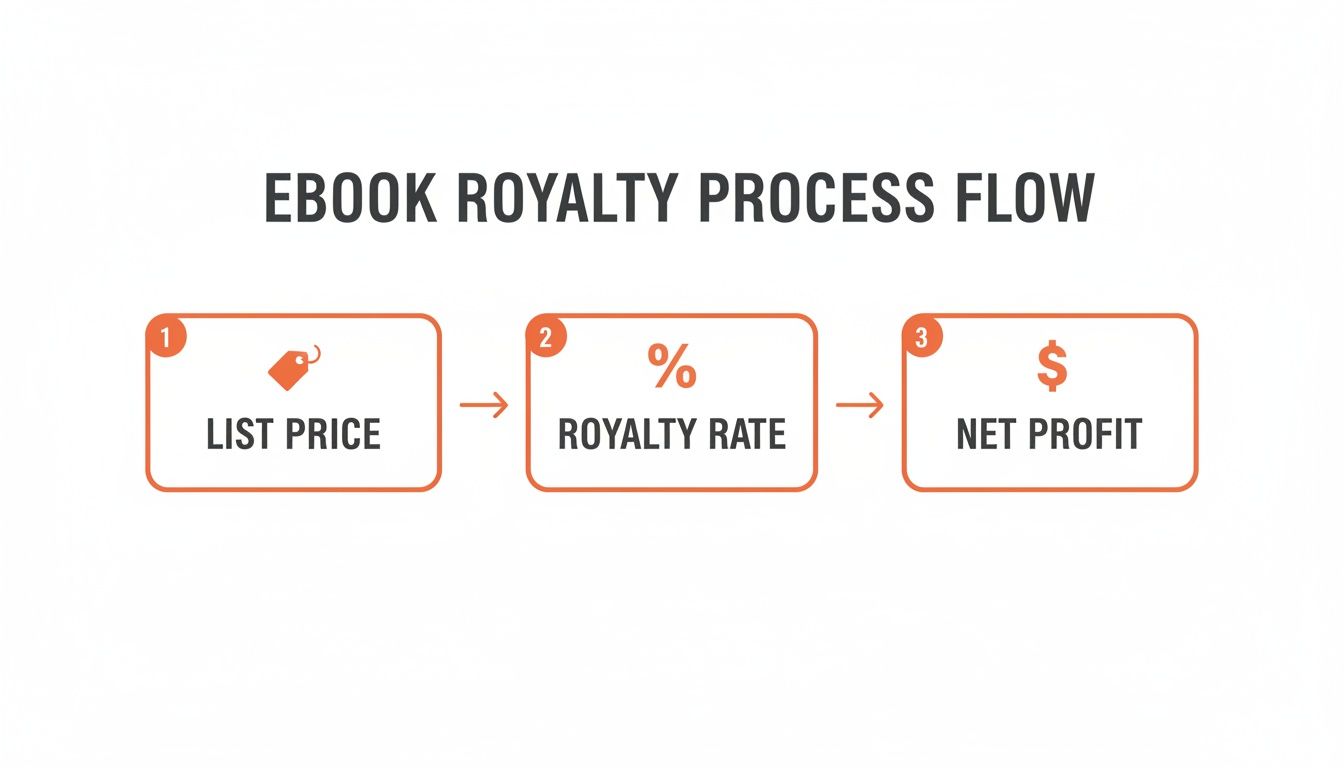
As you can see, your net profit is what’s left after the platform takes its cut—and for print books, that "cut" is primarily the printing cost.
What About Expanded Distribution?
KDP offers an "Expanded Distribution" channel, which can make your paperback available to other online retailers, physical bookstores, and libraries. It sounds great for visibility, but it comes with a major financial trade-off.
For sales through Expanded Distribution, your royalty rate drops to 40%.
Let's run the numbers on our same £12.99 book: (40% of £12.99) - £4.45 = £5.20 - £4.45 = £0.75 per sale.
That's a significant drop. You have to make a strategic choice. If your goal is to maximize profit from every Amazon sale, you might skip it. But if getting your book into as many hands as possible is the priority, even with thin margins, then enabling it makes sense. It's a classic reach vs. revenue decision.
If you want to dig deeper into how the whole business works, you might be interested in our guide on print on demand with Amazon.
Understanding Your Final Payout: Taxes and Currency
The royalty number on your KDP dashboard is a good start, but it's not what hits your bank account. It’s a gross figure, before Amazon makes two critical deductions: tax withholding and currency conversion.
Ignoring these can lead to a surprise on payday. Let's break down what happens to your money between a sale and your payout.
Amazon operates under US law, which means they must withhold taxes on author royalties. The rate depends on your country of residence and its tax treaty with the United States. For authors in countries without a treaty, this can be as high as 30% of your earnings.
Don’t Skip the KDP Tax Interview
When you set up your account, Amazon asks you to complete an online tax interview. This is not the place to click through quickly. This questionnaire determines your tax status and the withholding rate Amazon will apply to your payments.
To keep as much of your money as possible, you must provide a valid tax identification number from your country. If your country has a tax treaty with the US, this is how you claim its benefits. Getting this right can drop the withholding rate significantly, often to 0%.
Forgetting or incorrectly filling out the tax interview is one of the most common and costly mistakes new authors make. They see a payout that’s a fraction of what they expected and don’t know why. Keep your information accurate and updated.
If you need a more detailed walkthrough of the account creation process, our guide to setting up an Amazon Kindle Direct Publishing account covers these initial steps in depth.
The Reality of International Sales and Currency Conversion
Selling books on Amazon’s global marketplaces—like Amazon.co.uk, Amazon.de, or Amazon.jp—is fantastic for reaching more readers. But it means you’ll earn royalties in multiple currencies (GBP, EUR, JPY).
Amazon won't send you a handful of different currency payments. Instead, they convert everything to your primary currency before depositing it. This process can shrink your final payout.
Here’s what is involved:
Fluctuating Exchange Rates: The conversion rate isn't locked in when you make a sale. It’s based on the market rate when Amazon processes your payment weeks later. Daily currency fluctuations mean the final amount you receive will almost always be slightly different from what you see in your report.
Bank Fees: Your own bank might also charge a fee for receiving an international transfer or for currency conversion, further reducing your net profit.
If you earned €100 on Amazon.de, your KDP report will show that figure. But the final deposit in your UK bank account will be in GBP, calculated using the exchange rate on the transfer day, minus any fees. It’s smart to build a small mental buffer—perhaps 3-5%—into your income forecasts to account for these global banking realities.
How to Use Sales Estimators to Forecast Revenue

You’ve calculated your profit-per-book down to the penny. That’s great, but it’s only half the equation. The other piece is figuring out how many copies you might actually sell. This is where we move beyond a royalty calculator and start forecasting your potential monthly revenue.
This involves the Amazon Best Seller Rank (BSR). It’s a number Amazon assigns to every book once it makes at least one sale. The rule is simple: a lower BSR is better. It means a book is selling more copies than one with a higher rank.
Sales estimators are tools that take this single number and turn it into an educated guess of daily and monthly sales. They bridge the gap between your book's rank and your bank account.
Turning Rank into Revenue
These tools work by analyzing large amounts of sales data to model Amazon’s ranking algorithm. For any author serious about running their career like a business, this kind of insight is essential for strategic planning.
Imagine you just finished a week-long price promotion. You can track how your BSR changes. By plugging that new BSR into a sales estimator, you can see a tangible connection between your marketing efforts and an increase in sales. BSR stops being a vanity metric and becomes a core part of your financial forecasting.
A royalty calculator shows your profit per unit. A sales estimator helps forecast how many units you might sell. Using both gives you a powerful view of your potential revenue.
How Sales Estimators Work
An industry has grown around providing competitive intelligence on Amazon, with various free and paid sales estimation tools. Savvy authors use these to inform their pricing and content strategies.
There are many tools available to convert BSR into a sales estimate. They are essential for competitive research or setting realistic sales goals.
Here's a quick look at some popular options:
Popular Amazon Sales Estimator Tools
Tool Name | Key Feature | Data Source/Methodology | Best For |
|---|---|---|---|
TCK Publishing Calculator | Simple, free web-based tool | Proprietary algorithm based on public BSR data | Quick, free estimates for ebooks and print books without needing to sign up. |
Kindlepreneur's Sales Calculator | Detailed breakdown for ebooks vs. print books | Models sales curves across different BSR ranges | Authors wanting a more nuanced estimate that distinguishes between formats. |
Helium 10 Sales Estimator | Part of a larger suite of powerful seller tools | Processes over 2 billion data points daily for high accuracy | Serious sellers who need best-in-class data and are willing to invest in a comprehensive tool suite. |
AMZScout Calculator | Free and easy to use, with a supporting Chrome extension | Real-time data collection and historical trend analysis | Beginners or authors who want on-the-fly estimates while browsing Amazon. |
Each platform uses its own algorithm, refined with millions of data points, to model Amazon's sales ranking system. You can watch YouTube videos that dive into how these tools function to get a better sense of their capabilities.
Using one is simple. You find the BSR of a book—yours or a competitor's—and enter it into the tool. It then gives you an estimated number of daily or monthly sales for that rank.
Here’s how you can use this strategically:
Competitive Analysis: Find the top-performing books in your niche. Look up their BSR and plug it into an estimator to see their likely sales volume. This gives you a clear benchmark for what’s possible.
Goal Setting: If you learn that a BSR of 10,000 translates to roughly 15 sales a day, you now have a concrete, measurable target for your marketing efforts.
Price Testing: Analyze how a price change affects not just your profit per sale but also your BSR and overall sales volume. This helps you find the sweet spot between profit margin and sales velocity.
When you combine these sales estimates with the detailed financial data in your Amazon KDP reports, you get a comprehensive picture of your business's health. It lets you connect marketing spend to sales and make decisions backed by data, not just gut feelings.
KDP Calculations: Your Questions Answered
Calculating KDP royalties can feel confusing, especially when your final payout doesn't match what you expected. Let's clear up some of the most common questions about how your earnings are calculated.
How Do I Find My Book's Printing Cost or eBook Delivery Fee?
Amazon shows you this before you publish. It's not hidden.
When you're setting up your pricing in the 'Rights & Pricing' tab inside your KDP Bookshelf, the system displays the estimated printing cost for your paperback or the delivery fee for your ebook. This is your chance to adjust the list price and see exactly how it impacts your bottom line before you commit.
Why Is My KDP Payout So Much Less Than I Calculated?
This is a common frustration for new authors. The royalty report shows one number, but the bank deposit is smaller. It almost always comes down to one of three things:
Tax Withholding: This is the most frequent reason. If your tax information isn't filled out correctly, Amazon is required to withhold up to 30% of your royalties. Make sure your tax interview is complete and up-to-date.
Customer Refunds: Your final earnings are based on net sales. Any books returned by customers during the pay period are deducted from your total.
Currency Conversion: When you sell a book in another country, the royalty is calculated in that local currency. The final amount you receive depends on your bank's exchange rate on the day of the transfer, not the day of the sale. Those rates fluctuate daily.
Check your KDP reports for a detailed breakdown. The Historical Report feature in your dashboard is a powerful tool for this. It lets you filter sales and Kindle Unlimited (KU) data by date range and even by a single ASIN, so you can track one book's performance with precision. You can learn more on Amazon's official help page.
What Is the Most Profitable Price for an eBook?
To get the 70% royalty rate, your ebook must be priced between $2.99 and $9.99. Pricing it at $2.98 or $10.00 instantly drops your royalty to 35%.
Within that range, there's no single "best" price. It depends on your genre, your competition, and your reputation as an author. Many successful authors launch new books at $2.99 or $3.99 to attract new readers, then experiment with higher prices once the book has reviews and momentum.
Does Expanded Distribution Actually Help Sales?
It can, but it’s not a magic bullet for more income. Opting into Expanded Distribution makes your paperback available to a wider network of distributors, libraries, and bookstores, which is great for visibility.
The trade-off is a much lower royalty rate—just 40% of the list price, minus printing costs. For many authors, focusing on direct Amazon sales is more profitable per unit. Expanded Distribution is often best for authors whose main goal is maximum availability, rather than maximizing profit on every sale.
Ready to turn Amazon's AI into your competitive advantage? Cosmy audits your product listings to show you exactly how to optimise for visibility and conversion in Amazon's new AI-driven search. Stop guessing and start making data-backed content decisions. Get your free audit and see what Cosmy can reveal about your products at https://cosmy.ai.