A Practical Guide to ASIN to EAN Conversions

Written by

Cosmy
AI-driven eCommerce Optimization
Connecting your product's Amazon-specific ID (ASIN) to its universal barcode (EAN) is more than a technical task—it's essential for your business. A mismatch can make your products invisible in Amazon's catalog, hiding them from search results and hurting your sales across different countries. It's a simple data problem that can quietly cost you money.
Why Matching ASINs to EANs Matters for Your Amazon Business

Let's get straight to it. Your product’s success on Amazon depends on connected data. The ASIN (Amazon Standard Identification Number) is Amazon's internal tracking code for a specific marketplace, like Amazon.com. The EAN (European Article Number), or its American counterpart the UPC, is the global barcode that identifies your product everywhere else.
When Amazon doesn't realize your ASIN and EAN belong to the same item, problems begin. Your product’s visibility drops, making it difficult for both shoppers and Amazon's own search technology to find. This isn't a small risk; it directly affects your sales.
The Foundation of Your Product’s Identity
Think of your product as a book. The EAN is its ISBN—the universal number every bookstore in the world uses. The ASIN is just one local library's shelf code. If that library doesn't link its shelf code to the book's ISBN, it has no way of knowing it's the same book that's a bestseller in another country.
That’s how it works on Amazon. A missing ASIN to EAN link separates your product on Amazon.com from the same product on Amazon.de. For a more detailed explanation of how these numbers work, understanding Amazon ASINs is a good place to start.
The Real-World Impact of Disconnected Data
A broken data connection is a direct threat to your business. For example, we have seen popular electronics brands experience a sudden drop in sales because their European EANs were not correctly matched to their U.S. ASINs. When this happens, Amazon's system can't combine positive reviews or sales data from different regions. This weakens your product's overall ranking and authority on the platform.
Correctly matching ASINs to their EANs is a must-do for any seller. It's the first step in fixing visibility problems before they become revenue problems.
This data link is the backbone of a healthy Amazon catalog. When you get it right, you ensure that:
Global reviews and sales data are combined, which boosts your product's credibility.
Pricing and inventory levels stay in sync across different marketplaces.
Amazon’s search tools—like its AI assistant Rufus—can accurately find and recommend your product.
You avoid messy duplicate listings that can confuse customers and dilute your brand.
By managing this relationship, you turn a small technical detail into a real advantage. For more information, you can read our guide to the Amazon Standard Identification Number.
How to Manually Find an EAN on an Amazon Product Page
When you only need to find the EAN for one or two products, the most direct way is to look for it yourself on Amazon. You don’t need special software. The product page itself usually has the information, if you know where to look.
The process is simple. First, go to the Amazon product detail page for the item. Scroll down past the images, title, and bullet points until you find a section called "Product information" or "Technical Details."
Locating the Identifier on the Page
This section is usually a table with details like dimensions, weight, and model number. It's also where Amazon often lists a product’s global identifier. Look for a row labeled "UPC" or "EAN."
For instance, if you were looking at a listing for a Logitech wireless mouse, this is where you would expect to find its 12-digit UPC or 13-digit EAN. A UPC is just as useful as an EAN. They are both types of Global Trade Item Numbers (GTINs) and serve the same purpose for identifying a product.
A common mistake is to only look for an "EAN" and give up. A UPC (Universal Product Code) is the American equivalent and works just as well for linking a product's identity. Finding a UPC accomplishes the same goal as finding an EAN.
When the EAN Is Not Visible
Sometimes, this field is empty. The seller might not have provided the information, or Amazon may not be displaying it. If you've checked the product details and can't find it, you have another option. It’s a bit more technical but still simple: check the page's source code.
This might sound complicated, but it’s easy. On the product page, press Ctrl+U (on Windows) or Cmd+Option+U (on Mac). This will open a new browser tab showing the page's raw HTML code.
Now, use your browser's find function (Ctrl+F or Cmd+F) and search for these terms:
upceangtin
Often, the identifier is hidden in the code even when it’s not displayed on the page. This simple trick can help you find the EAN you need to complete your ASIN to EAN match.
If you want to learn more about how ASINs work on Amazon, read our guide on how to use Amazon search by ASIN. For quick lookups, this manual method is a reliable way to get the data you need without any extra tools.
Using Tools for Bulk ASIN to EAN Conversion
Checking product pages one by one for EANs is fine for a few items. But if you manage a large catalog, it’s a waste of time. Every minute spent on manual lookups is a minute not spent on strategy.
This is where third-party conversion tools become essential.
These tools are built to automate the ASIN to EAN matching process for many products at once. Instead of copying and pasting, you can upload a file with thousands of ASINs and get back a list of the corresponding EANs in minutes. This shift from manual work to automation frees up your team to focus on analysis and growth.
Choosing the Right Conversion Tool
When looking for a converter, you'll find two main types: free web-based tools and paid API services. Each has its use, and knowing the difference helps you choose the right one for your needs.
Free Web Tools: These are great for small jobs. If a small brand needs to check 100 product listings, they can paste a list of ASINs into a web form and download the results. They're fast and don't require any technical setup.
Paid API Services: For agencies, large brands, or anyone managing many products, an API is the only practical solution. It lets you build the conversion process directly into your own software, pulling data automatically without needing to handle files manually.
Here's the real value: many bulk converters do more than just match an ASIN to an EAN. They often provide other useful information, like current sales rank, price, review counts, and category. This turns a simple lookup into a powerful tool for market analysis.
This extra data gives you a snapshot of a product’s performance alongside its identifier. If you want to learn more about how to pull this kind of information automatically, check out our guide to the Amazon Product API.
The Power of Bulk Processing in Practice
For marketers in high-volume categories like computer parts or smart home devices, bulk conversions are key to expanding globally. Specialized tools can process up to 50,000 codes in a single spreadsheet, at speeds of over one million per hour.
For example, a 2025 analysis of the IT sector found that 85% of the top 10,000 server hardware ASINs had different EANs for various European markets. This allowed smart sellers to list their products on other platforms like eBay and Shopify without creating new product codes from scratch. You can find more information about these tools at datacluster.com.
Why Your ASIN-to-EAN Match Might Be a Dead End
So you have an ASIN, but finding its EAN isn't always straightforward. On Amazon's large and sometimes messy marketplace, a simple task can quickly become complicated.
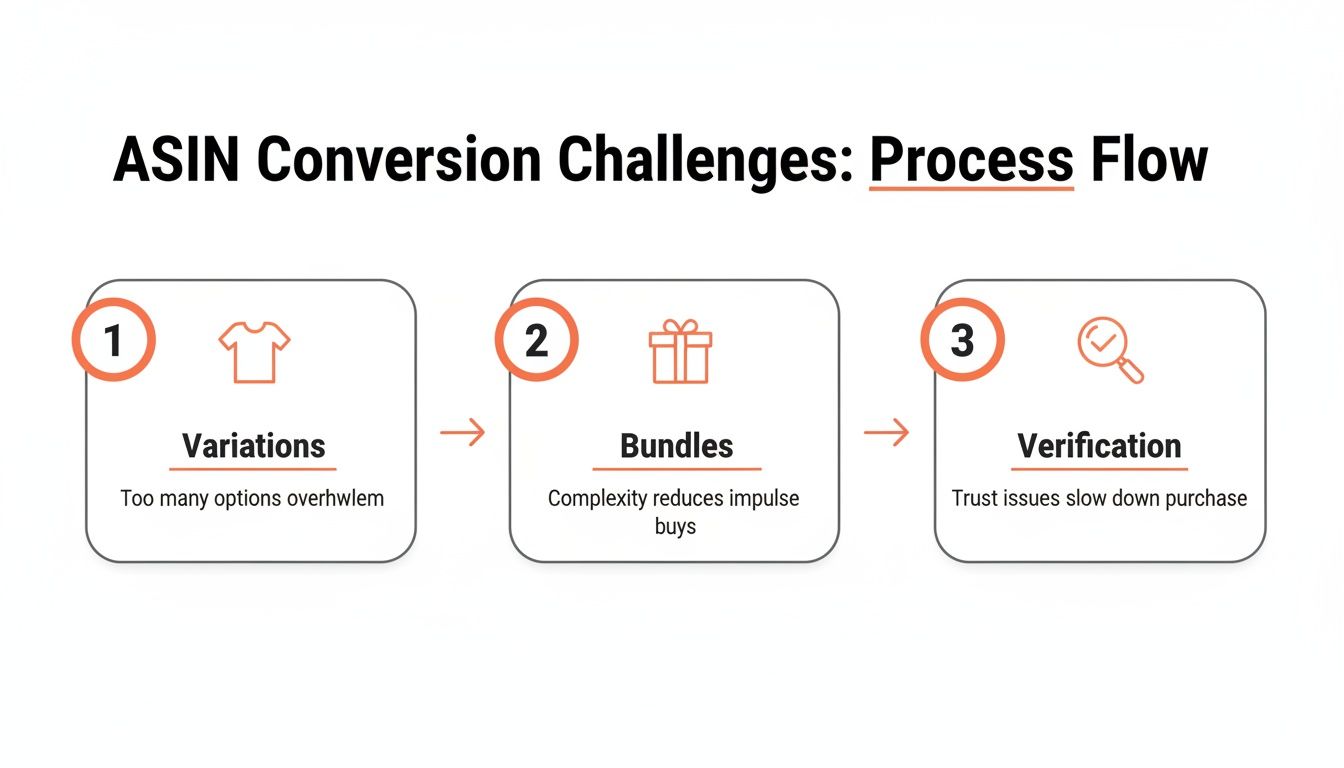
You will run into problems. The most common issues are product variations, seller-created bundles, and simply incorrect data. To solve these, you need to understand why they happen and how to handle them.
The Variation Minefield
The biggest challenge is product variations. Take a simple pair of running shoes. That one product might have dozens of ASINs. Every single combination of size and color gets its own unique ASIN and—this is the important part—its own unique EAN.
A size 10 shoe in blue has a different EAN than the same shoe in size 10.5. The red version has another EAN. This is intentional. The EAN identifies a specific, sellable item. You have to find the EAN for the exact variant you need, not just the main product.
Decoding Bundles and Private Label Mysteries
Then you have seller-created bundles. Imagine a seller packages a camera, a memory card, and a case together. Amazon gives this new "product" a unique ASIN. But there’s no manufacturer-issued EAN for it because it’s not a standard retail product. The seller must get a new GTIN for their custom bundle if they want to list it elsewhere.
Private label products are similar. Since the brand owner is the manufacturer, there is no existing EAN to find. It's their responsibility to buy and assign their own EANs from an official organization like GS1. If they haven't, you won't find one.
The biggest mistake is assuming the data you find is correct. An ASIN can be linked to the wrong EAN, or the barcode number on a product page could be fake. Never trust this data without checking it.
The Non-Negotiable Verification Step
Why is the data often wrong? Typos during data entry, sellers grabbing the first barcode number they find, or old listings created before Amazon enforced GTIN rules can all cause problems. These broken links between ASINs and EANs can mess up your inventory tracking and hurt your product's visibility.
The only solution is to verify every EAN against a reliable source. Your best option is the GS1 Global Electronic Party Information Registry (GEPIR) or a similar official database. Enter the EAN and see who it’s registered to.
This step is not optional. It’s your safety net. Verification confirms three key things:
Ownership: Is the EAN registered to the correct brand?
Product Match: Does the EAN belong to the exact product (and variation) you're looking at?
Authenticity: Is this a real, globally recognized identifier, or just a made-up number?
Taking a minute to do this saves you from the major problems that come from using bad data. Don't skip it.
Putting Your EAN Data to Work in Your Content Workflow
So you've matched your ASINs to their EANs. What's next? This isn't just about cleaning up a spreadsheet. That clean data is your way of communicating with Amazon's AI and improving your visibility.
A complete and accurate ASIN-to-EAN map is exactly what performance auditing platforms like Cosmy use. They don't just see a list of numbers; they see the relationships between products. More importantly, they find the broken relationships that are making your products invisible within Amazon.
Finding Your Blind Spots in AI Search
One of the first things you can do with this data is figure out why Amazon's AI assistant, Rufus, might be ignoring your product. If shoppers ask relevant questions and your product doesn’t appear, a data problem is often the cause. An AI-powered audit using a complete ASIN-to-EAN map can identify these issues quickly.
For example, a platform like Cosmy can cross-reference your catalog and see that your listing on Amazon.com is being ignored because its EAN doesn't match the one on Amazon.de. Amazon's AI needs these identifiers to understand it's the same product. Without that link, it can't combine your product's authority, reviews, and sales history.
A clean ASIN-to-EAN map helps Amazon's AI understand your products. Without it, you're telling the system that your products in different countries are unrelated, which splits your sales history and review power.
This process isn't always simple. As the flow diagram shows, everything from product variations to bundles can create data gaps that need to be found and fixed.
From a Spreadsheet to a Strategic To-Do List
Let's look at a real-world example. A consumer electronics brand feels their organic search performance is declining but isn't sure why. They use a bulk conversion tool to create a full ASIN to EAN map for their 500-product catalog.
They upload that spreadsheet into their content audit platform. The results are immediate:
The system flags 15% of their products (75 items) with an "Identifier Mismatch" warning.
It shows that these items have poor performance and are not being recommended by Rufus for their most important search terms.
Instead of a vague problem, the platform provides a clear action plan: fix the EANs on the highest-traffic products first.
This is the power of connected data. The brand goes from a feeling—"our visibility is low"—to a specific, data-backed to-do list they can act on right away.
In the competitive world of Amazon IT, this process is essential. For example, European IT products have a 90%+ match rate when converting EANs to US ASINs due to standardized supply chains. For these sellers, failing to match identifiers means leaving money on the table, as mismatched data can cause up to 40% of visibility gaps in Rufus AI recommendations. You can find more data on this in the rocketsource.io EAN to ASIN conversion study.
Frequently Asked Questions About ASIN and EAN
As you manage your product catalog, you'll likely have some common questions about ASINs and EANs. Getting clear answers will help you understand the relationship between Amazon's internal codes and the global barcodes used in retail.
Here are the most common questions from sellers.
Is a UPC the Same as an EAN?
For practical purposes on Amazon, yes. They are not identical—a UPC has 12 digits and an EAN has 13—but they are both types of Global Trade Item Numbers (GTINs). They serve the same function: to uniquely identify a product for global trade.
If you are looking for an EAN and find a UPC, you have found the universal product ID you need. Don't worry about the difference.
What If a Product Has No EAN?
This happens more often than you might think, especially with certain types of products. You often won't find an EAN for:
Private label products where the brand owner sells only on Amazon.
Handmade items or products sold through programs like Amazon Handmade.
Custom product bundles created by a third-party seller.
Old product listings created before Amazon became strict about GTINs.
If you are the brand owner, you can fix this. You need to purchase and register your own official GTINs from an organization like GS1. This gives you a globally recognized EAN or UPC that you officially own and can assign to your products.
For any private label brand, buying your own GS1-registered barcodes is essential. This is how you establish yourself as the official owner of your product identifier and grow your business beyond a single marketplace.
Can I Use an EAN From a Different Amazon Site?
Yes, and you should. This is an important point that many sellers misunderstand. An EAN is a global identifier, not a regional one. The EAN for a product on Amazon.de should be the same one used for that product’s listing on Amazon.com or Amazon.co.uk.
In fact, syncing this data is a key reason to perform an ASIN to EAN audit. When you link all your international listings through a single, shared EAN, you are telling Amazon’s algorithm they are the same item. This helps combine sales history, reviews, and ranking signals, creating a stronger global presence instead of having separate listings competing with each other.
Ready to stop guessing and start winning in Amazon's AI-driven marketplace? Cosmy delivers the actionable intelligence you need to diagnose visibility gaps and optimise your content with confidence. Get your free audit today and see what Amazon's AI really thinks of your products at https://cosmy.ai.