How to Set Up Your Amazon Kindle Direct Publishing Account
Written by

Cosmy
AI-driven eCommerce Optimization
Setting up your Amazon Kindle Direct publishing account is the first step to becoming a self-published author. The process is free and straightforward. You will provide your personal details, tax information, and banking specifics so Amazon can pay you royalties. This account is your key to a global, digital bookstore.
Your KDP Account Setup Guide
Creating your KDP account turns your manuscript into a product that millions of people can buy. This guide is about being prepared, not about technical skill.
Before you begin, gather all the necessary documents and information. Rushing this step often leads to verification problems and payment delays. A few minutes of preparation now will save you from future frustration.
The first decision you'll make is whether to publish as an individual or as a business.
For most new authors, an individual account is the simplest choice. You will use your personal name, home address, and personal bank account. This is the right option if you plan to publish under your own name or a pen name and do not have a registered company.
If you have already established a publishing company, you can register as a business. You will provide the company's legal name, official address, and business bank account details. This choice affects how your tax information is filed and where your royalty payments are sent.
A common problem is a name mismatch. The legal name on your KDP account, bank account, and tax documents must match exactly. For example, using "John A. Smith" on one document and "John Smith" on another can cause your account to be flagged for manual review, delaying your first royalty payment.
This checklist will help you gather everything you need. Once your account is set up, our guide on how to properly use your new Amazon KDP account can help you plan your next steps for growth.
First, let's prepare you for the sign-up process.
KDP Account Setup Checklist
Gathering these details beforehand will make the KDP account setup process quick and easy.
Item Category | What You Need |
|---|---|
Personal Information | Your full legal name, physical address, and phone number. This must match your official documents. |
Business Type | Decide if you are an "Individual" (for most new authors) or a "Corporation/Partnership." |
Tax Information | Your tax identification number. For U.S. authors, this is your Social Security Number (SSN) or an Employer Identification Number (EIN). |
Payment Details | Your bank account information, including the account holder's name, account number, and routing number (or its equivalent for your country) for direct deposit. |
Having these four items ready before you visit the KDP website will allow you to complete the setup in under 15 minutes.
Handling the Money Side: KDP Tax and Payment Info
With your basic account details ready, it is time to handle the financial information. This part often concerns new authors, but it is not complicated. Amazon has created a simple process to ensure they can legally pay you, regardless of your location.
The Online Tax Interview
You will start with a guided online tax interview. This is a questionnaire that helps Amazon determine your tax status. You will state whether you are publishing as an individual or a business and provide your Taxpayer Identification Number (TIN).
For authors in the U.S., this is typically your Social Security Number (SSN) for an individual account or an Employer Identification Number (EIN) for a business. This process is the digital equivalent of filling out a W-9 tax form.
If you are outside the U.S., you will enter your country's tax ID number. This step is important because it determines the tax withholding rate on your U.S. sales. If your country has a tax treaty with the United States, providing this information can lower or eliminate the percentage Amazon withholds.
Choosing How You Get Paid
After completing the tax interview, you will tell Amazon where to send your royalties. The options available depend on your location.
Direct Deposit (EFT): This is the most popular option. It is fast, free, and deposits money directly into your bank account. It is available in the UK, EU, US, Canada, Australia, and many other countries.
Wire Transfer: If direct deposit is not available in your country, a wire transfer is the next best option. Be aware that your bank may charge a fee to receive the payment, and there is a minimum royalty amount required before Amazon sends the funds.
Cheque: This is the least practical option. It is slow, requires waiting for mail delivery, and also has a minimum payment threshold. Use electronic methods if possible.
If you are unsure whether to choose "Individual" or "Business," this decision tree can help.
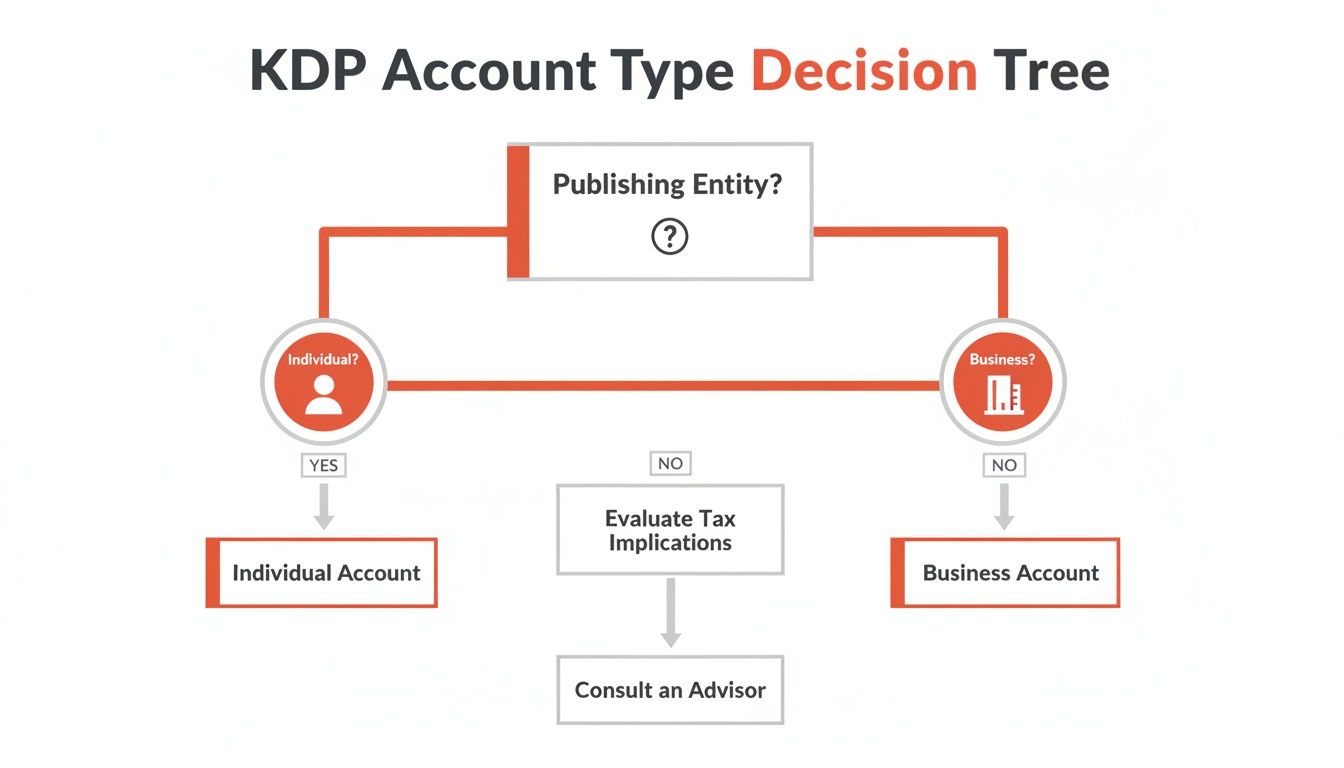
As shown, the "Individual" path is the most direct route for most new authors, linking your royalties to your personal tax information.
Key Takeaway: Double-check that the name on your bank account is an exact match for the legal name and tax information you provided to KDP. A missing middle initial or a slight misspelling can lead to payment holds that are difficult to resolve later.
Maximising Your Earnings from Day One
Getting your financial details right is about setting up a sustainable business. The potential for earnings is significant.
For example, thousands of European authors now earn over €50,000 a year through KDP, with authors in Germany, France, and the UK leading this trend. A correct setup from the start ensures you can join them without facing administrative obstacles.
After entering all your information, review it one last time before submitting. Thinking about your potential income can be a great motivator.
If you want to estimate what your royalties could be, check out our https://blog.cosmy.ai/kindle-direct-publishing-royalty-calculator. It is a useful tool for forecasting your earnings based on your book’s price, format, and sales estimates.
Solving Common KDP Verification Problems
Experiencing a verification issue with your Amazon Kindle Direct Publishing account is frustrating but common. Most problems are caused by a simple mismatch in the information provided. The solution is to ensure every piece of data aligns perfectly across all your documents.
The most frequent issue is a name mismatch. This occurs when the legal name on your KDP account, your bank account, and your tax documents are not identical. A small difference, such as using "Rob" on one form and "Robert" on another, can trigger an automated flag and stop your verification.
Correcting Information Mismatches
If you suspect a name or address error, start by carefully reviewing your information. Log in to your KDP account and go to the "Your Account" section. Compare the details under "My Profile" and "Getting Paid" with your official bank and tax records.
Focus on these three areas:
Bank Account Name: The account holder name in KDP must be the exact legal name on your bank statements. Do not use nicknames or abbreviations.
Tax Identity Information: Verify that the name and Taxpayer Identification Number (TIN) entered during the tax interview match your official tax documents perfectly.
Physical Address: Ensure the address provided matches the one associated with both your bank account and tax filings.
Once you find a discrepancy, update the incorrect field in your KDP account and save the changes. This usually resubmits your information for verification and can resolve the issue within a few days.
A practical tip is to place your most recent bank statement and a tax form next to your computer screen and compare them line-by-line with your KDP account page. This direct comparison makes it easier to spot subtle typos or an old address causing the delay.
When to Contact KDP Support
If you have corrected all visible errors and your account is still pending verification after 72 hours, it is time to contact KDP support.
Do not send a vague message like, "My account is stuck." Instead, provide a clear explanation of the problem and the steps you have already taken. This helps the support team identify the issue more quickly.
For example, write something like, "I have confirmed my legal name, 'John Michael Smith,' matches my tax and bank records exactly, but my account verification has been pending for over 72 hours." This level of detail helps the support team diagnose the issue efficiently, turning a major problem into a minor one.
Managing Your Account for Long-Term Success
Getting your Amazon Kindle Direct Publishing account approved is just the beginning. The real work starts now. A well-managed account is the foundation of your author business, converting your creative work into a steady income. This means shifting your focus from the initial setup to the daily practices that successful authors use.
The most important habit to develop is regularly checking your KDP Reports. This dashboard is more than just a way to track earnings; it is a business tool for understanding your readers and the market. By analysing these reports, you can identify sales trends, see which of your books are performing well, and monitor your royalties across different countries.
Interpreting Your KDP Reports
Your reports dashboard contains data that should guide your publishing strategy. To avoid feeling overwhelmed, start by answering a few key questions.
Which books are selling the most? This tells you what connects with your audience and can inform your next writing project.
What does my sales graph look like? Look for spikes in sales. Did a promotion or a social media mention cause an increase? This helps you understand which marketing efforts are effective.
How are my Kindle Unlimited page reads trending? If your book is in KDP Select, this metric is crucial. Consistent page reads indicate a steady source of passive income.
Understanding this data is the first step toward making better business decisions. To learn more about each metric, you can find out how to analyse your Amazon KDP reports.
The KDP Select Decision
One of the most significant strategic decisions you will make is whether to enrol your book in KDP Select. This program gives Amazon exclusive digital distribution rights for 90-day periods, which renew automatically unless you opt out.
In return for exclusivity, Amazon provides access to powerful promotional tools. Your book becomes available in Kindle Unlimited (KU), and you are paid for every page that subscribers read. You can also run promotions like Kindle Countdown Deals or offer your book for free for a few days to attract new readers.
The choice between being exclusive to Amazon or distributing on other platforms like Kobo or Apple Books is a critical one for any author. There is no single correct answer; it depends on your goals, genre, and how much control you want over your book's distribution.
The decision comes down to weighing the benefits. For many authors, particularly those in popular genres like romance or fantasy, the income from KU page reads can be substantial. For example, in India, Amazon KDP's 200% surge in Kindle sales was driven by KDP Select's 70% royalties and access to the global Kindle Unlimited fund. You can learn more about KDP's global reach on their help page.
The trade-off is that giving up the freedom to sell on other platforms makes you completely dependent on Amazon.
Preparing to Publish Your First Book
Your Amazon Kindle Direct Publishing account is set up and verified. Now it is time to turn your manuscript into a product that people can buy.
This next stage is crucial. It is where your book transitions from a document on your computer to a product on the world's largest bookstore. Your book's Amazon page is its digital storefront. Every element must work together to attract a reader's attention and persuade them to buy.
Before you can do that, you need to prepare your files.
Getting Your Files Ready for Upload
Amazon has specific requirements for file formats to ensure every book looks good on every Kindle device. Submitting poorly formatted files is a common and frustrating mistake for new authors. It can result in incorrect spacing, broken images, and an unprofessional appearance.
To avoid these problems, follow their specifications:
Manuscript: While KDP accepts several formats, a properly formatted EPUB file gives you the most control. Uploading a Word document and hoping for the best can lead to formatting issues like random page breaks and font glitches.
Cover: Your cover must be a high-resolution JPG or TIFF file. Amazon recommends a size of 2,560 x 1,600 pixels. This ensures it looks sharp and professional on high-definition Kindle screens and as a small thumbnail in search results.
Addressing these technical details first will make the upload process smoother and signal quality to potential readers.
The most effective book listings are created long before you click "publish." They result from understanding what makes a reader stop scrolling, click on your cover, and decide your book is the one they want to read.
Creating a Listing That Sells
With your files prepared, it is time to build your listing in the KDP dashboard. This is your sales pitch. A great cover gets the click, but your listing details make the sale.
Your two most powerful tools are your book description and your keywords.
Your book description is not a summary; it is marketing copy. It should hook the reader, build interest, and create an emotional connection with your target audience. It is the digital equivalent of a back-cover blurb.
For keywords, think like a reader. What would someone type into the Amazon search bar to find a book like yours? KDP provides seven keyword slots—use all of them. Use phrases that mimic real searches. For example, instead of just "thriller," use "post-apocalyptic survival thriller." This is more specific and effective.
Finally, consider how readers will access your content. Many Kindle devices support features like Text to Speech for Kindle, making your book available to a wider audience. Understanding these platform features gives you an advantage in a growing global market. For instance, India has become Amazon KDP's fastest-growing market, with Kindle sales recently increasing by 200%.
Got Questions About Your KDP Account? We've Got Answers
Starting with Amazon KDP can feel overwhelming. There are forms to fill out, tax interviews to complete, and new terms to learn. Let's address some of the most common questions new authors have.
Getting these details right from the start will save you significant trouble later.
Do I Need a Business to Open an Amazon KDP Account?
No, you do not. Most authors on KDP register as individuals, using their personal tax and banking information. This is the simplest and most common approach.
Creating a formal business may be beneficial later if you are building a larger publishing company, as it can offer legal or financial advantages. But to begin, it is not necessary. If you are considering the long-term pros and cons, consulting with a financial advisor is recommended.
How Long Does KDP Account Approval Usually Take?
Typically, your account will be approved within 24 to 72 hours. If it takes longer, it is almost always due to a small error in your information.
The most common issue is a data mismatch. Before you submit your application, double-check that the name on your KDP account is an exact match to the legal name on your bank account and tax documents. Even a missing middle initial or a slight variation can trigger a manual review, which delays the process.
Can I Use KDP if I Live Outside the United States?
Yes, you can. KDP is a global platform open to authors from most countries. During the setup process, you will complete an online tax interview where you provide the required tax information for your country of residence.
Your location affects how you get paid. While direct deposit is available in dozens of countries, Amazon also offers wire transfers or cheques for regions where local banking systems are not directly supported. It is a good idea to check the payment methods available for your country early in the process.
Can I Have More Than One Amazon KDP Account?
The answer is a firm no. Amazon's terms of service strictly prohibit authors from operating more than one KDP account.
Do not attempt to create a second account. This is one of the quickest ways to have both accounts permanently closed and all your books removed from the store. It is not worth the risk. Use your single, authorized account for all your publishing activities.
Ready to turn Amazon's AI into your competitive advantage? Cosmy analyses your product listings to reveal exactly how to optimise your content for better visibility and higher conversion rates. Get started with a free audit and see what you're missing at https://cosmy.ai.